How to create a personalized story with photos: a step-by-step guide
How to choose a reference photo, turn it into an illustrated character, and protect a child's privacy in a personalized story.
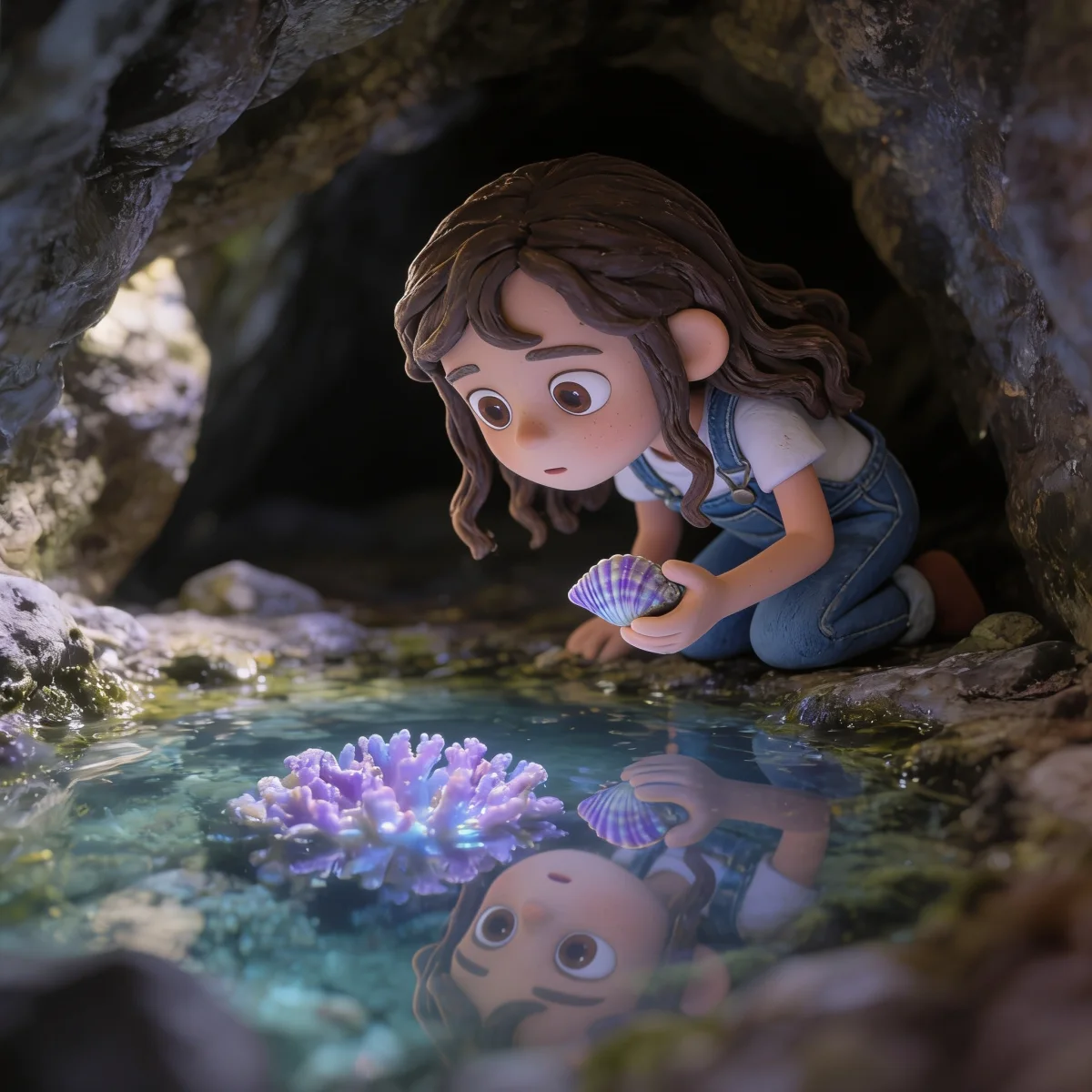
A reference photo is not pasted into a story. It helps create a recognizable illustrated character who can step into a completely new adventure.
To create a personalized story with photos, start with a clear picture of the hero, a few details about who they are, and an idea for their adventure. The photo supplies visual cues. What you share about the child supplies their personality, their world, and the heart of the story.
In Imagibo, you can add one photo for the main character and another for their companion. Both are optional. A thoughtful written description is enough if you would rather not upload an image.
This guide explains which photos work best, what happens after an upload, and how a private reference becomes an illustrated character in a children’s story.
What does Imagibo do with the hero’s photo?
The photo has one specific purpose: to guide the character’s first illustrated portrait. Before the story is written, we extract a short, neutral visual description limited to visible details such as hair, eyes, glasses, or a distinctive item of clothing. This prevents the words and the picture from contradicting each other.
We then create a portrait in the illustration style you chose. The cover and story scenes use that portrait as their visual reference, rather than working directly from the original photo. It helps the hero remain recognizable from one page to the next.
The goal is not a photorealistic copy. We want the child to recognize themselves as a story character, with the important features and familiar details that make the illustration feel like them.
Which photo makes the best reference?
The best reference is clear, recent, and easy to understand at a glance. Official guidance for digital photos emphasizes the same basics that help here: sharp focus, balanced light, and an unobstructed face.¹ A passport-style pose is not necessary. A natural expression and a favorite piece of clothing can carry far more personality.
Choose an image where:
- one person appears clearly in the foreground;
- hair, hands, costumes, or strong shadows do not hide the face;
- hair color and shape, eyes, and glasses are easy to distinguish;
- filters have not changed the person’s features;
- a useful personal detail is visible, such as a favorite overall or well-loved toy.
Avoid group shots, heavily compressed screenshots, and photos taken from far away. If you need to zoom in a long way to find the face, another image will usually work better.
From photo to story, step by step
This example comes from a demo book we made with a staged reference photo. It does not belong to a customer and was specifically approved for showing this transformation.
Step 1: add the reference photo
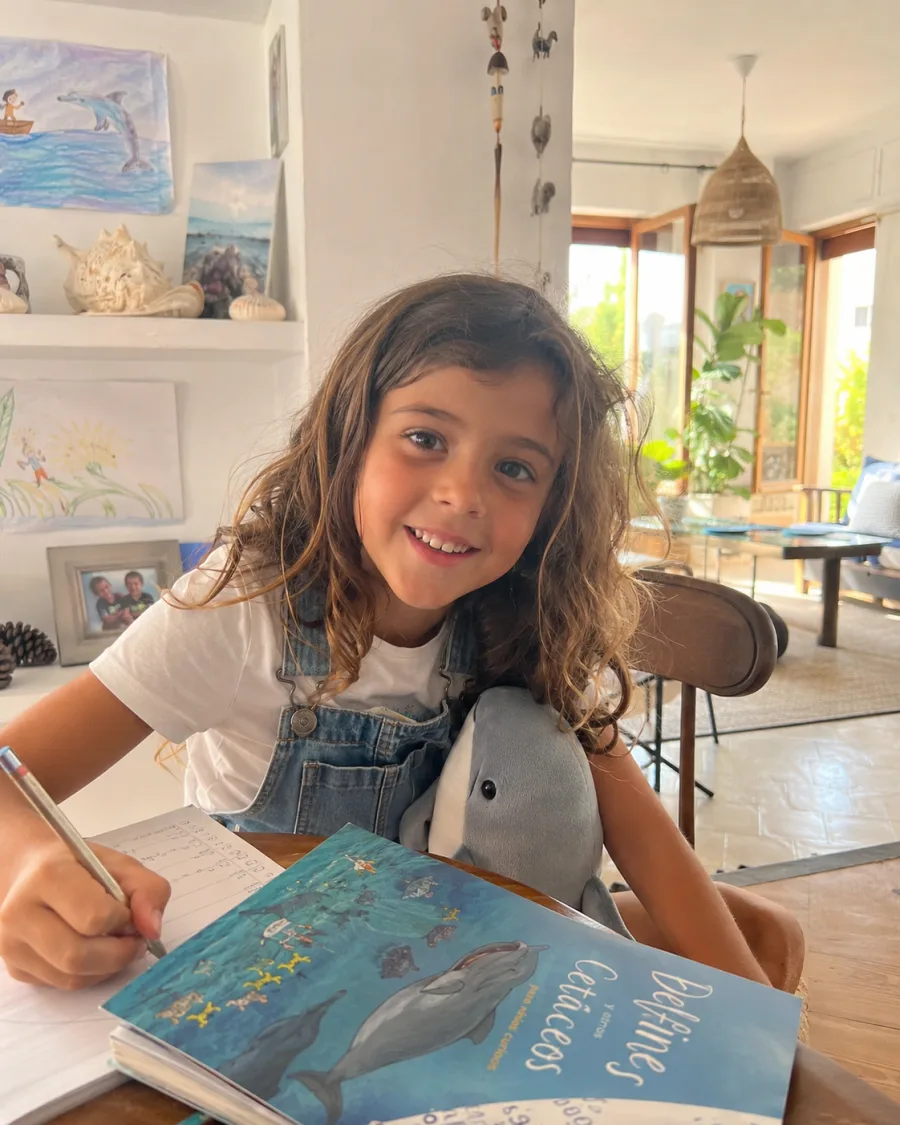
Olivia has wavy brown hair and denim overalls. Her room also hints at something she loves: a dolphin toy, drawings of sea animals, and a book about whales. The story does not need to use everything in the photograph. It picks up only the details that fit the chosen idea.
Step 2: create the illustrated portrait
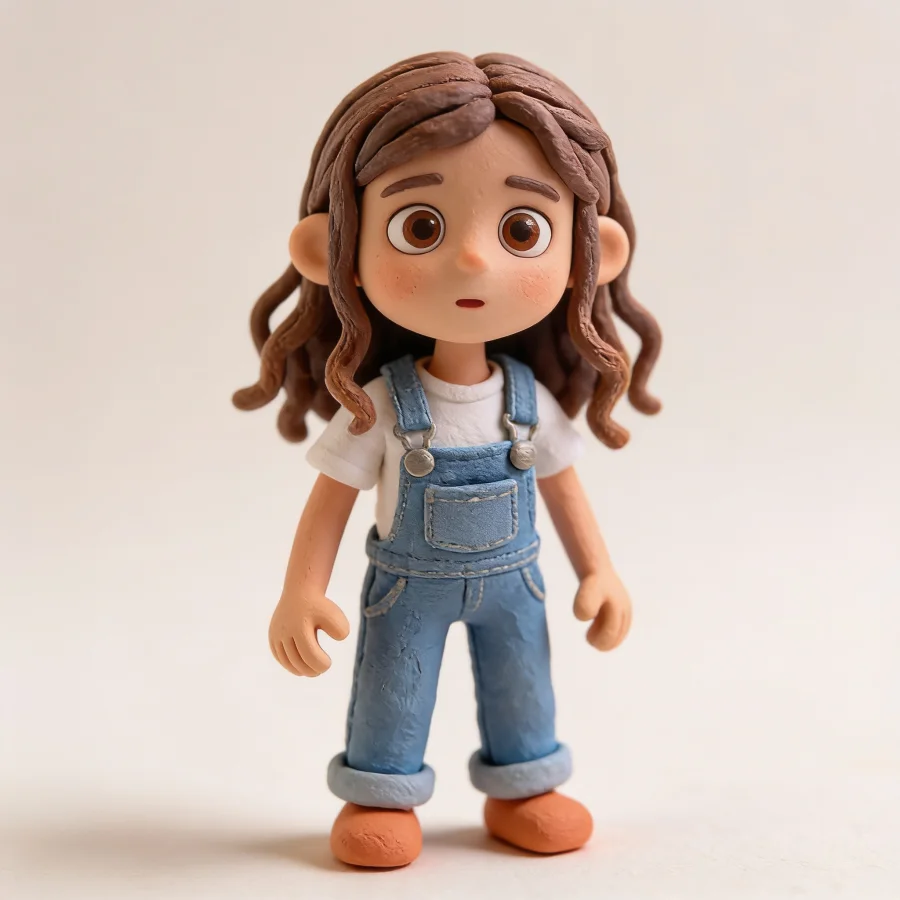
The portrait keeps the features that make the hero recognizable and adapts them to the book’s art style. This portrait becomes the visual anchor for the rest of the illustrations. If the portrait needs to be generated again during production, the original photo remains the starting reference.
Step 3: let the character live inside the story
The finished scene brings back Olivia’s hair, overalls, and fascination with the sea, but the room from the reference photo has become a secret cove with glowing coral. That continuity matters more than copying every pixel in the photograph.
Research into personalized books points in the same direction. When the content connects meaningfully with a child, it can increase their participation during shared reading and help them learn new words.² The best-known study involved only eighteen children, so this is an encouraging signal rather than an educational guarantee.
A photo cannot replace what you know about the child
A recognizable face does not make a story personal by itself. The photograph contributes appearance. You choose the details that could only belong to this particular hero:
- who joins them on the adventure;
- which places and small obsessions make up their world;
- how much magic belongs in the story;
- which value you want to explore, such as asking for help, patience, or self-belief;
- which art style suits the adventure.
That is the difference between placing a face into a template and creating a personalized children’s story from the ground up. Rich personalization combines self-recognition with other people, places, and imagined worlds instead of turning every page into a mirror.³
Which kind of photo story are you trying to make?
When someone looks for a personalized story with photos, they may be comparing very different products. Some services place the photo inside an existing story. Others turn the image into a digital character very quickly. Another path is to use the photo as a reference inside a new story.
The right choice depends on the gift you want to give.
| If you want… | You may want… | Before deciding, check… |
|---|---|---|
| The real photo visible in the book | A photo-template story | Whether the story is already written, how many pages you can personalize, and whether you will see a proof before paying. |
| A very fast digital option | A photo or AI story tool | Whether you can review the character, fix resemblance issues, and understand what happens to the image afterward. Some services show the character before you continue and promise to redraw it if it does not feel right.⁷ |
| A printed story that grows from the child | A co-created story written from scratch | Whether the photo is only a visual reference, whether you can read the full story before buying, and whether the physical product fits your gift deadline. |
A photo-led competitor may be stronger than Imagibo if you want a more direct likeness or a hardcover available now. For example, some template books ask for a front-facing photo, offer softcover and hardcover options, and let you adapt some text before confirming the order.⁸
Imagibo is a better fit when the photo is the starting point, not the finished idea: you want the hero to recognize themselves, and you also want an original story shaped by their world, companions, and the value you choose.
How is a child’s photo protected?
An identifiable photograph is personal data, and children’s data deserves particular protection.⁴ Uploading a photo is optional, and its use is limited to creating the book’s character. We accept JPEG, PNG, and WebP files up to 10 MB. When the file is stored, we correct its orientation and remove its metadata.
If someone leaves before creating the story, the unfinished project and its photos are deleted after seven days. When a story is created, the reference stays attached to that private project. It does not appear in the public library or become marketing material by default. A public comparison requires separate permission and a curated demo book.
This kind of data minimization is practical, not ceremonial. European data-protection guidance says services should process only the personal data needed for their purpose by default.⁵ It is also worth checking what happens to an image before uploading it to any tool that transforms photos.⁶
Use a picture you have the right to share, avoid images that identify other people, and keep school names, addresses, and the child’s full name out of the frame.
What can you check before ordering the printed book?
You do not have to buy blind. Creating the story is free: you can read the complete story and see the characters, cover, and illustrated first chapter before deciding whether to print it.
The physical book is optional. It costs €29.99 plus €5.99 shipping, measures 21.6 × 21.6 cm, and is printed as a full-color softcover on thick coated paper with a matte-laminated cover. After purchase, the remaining illustrations and print files are completed. For Spain, our conservative estimate is 2 to 3 weeks from purchase; international delivery can take longer.
Conclusion: a reference for imagining, not a photo to copy
A good photo makes it easier to keep the hero recognizable, but the story grows from much more: their personality, the people they care about, the world they imagine, and the value you want to give them.
Start with one clear image and a handful of true details. Those details can become an adventure that belongs to this child alone.
Create your personalized story and add a reference photo if you choose. You can read the complete story before deciding whether to order the printed book.
Frequently asked questions
Do I have to upload a photo to create the story?
No. A photo is optional. You can describe the hero’s appearance and personality in your own words and create the story without uploading an image.
Which file types and sizes can I use?
We accept JPEG, PNG, and WebP images up to 10 MB. Choose a sharp, well-lit photo where the face is easy to see.
Can I add photos of two characters?
Yes. You can add one reference for the hero and another for their companion. The second photo is unnecessary if the story has no companion or you prefer to describe them.
Will the result be an exact copy of the photograph?
No. The photo guides an illustrated portrait in your chosen art style. The important features stay recognizable, but the result remains an illustration.
Will the child’s photo be published online?
Not by default. The reference belongs to the private project and does not appear in the public library. Visible comparisons require separate permission and are enabled only for demo books created for that purpose.
Which photos should I avoid?
Avoid group shots, dark or blurry images, filters that change the face, and photographs where other people can be identified. Do not include visible school or address details.
Sources
¹ Rules for digital passport photos - GOV.UK
² Reading Personalized Books with Preschool Children Enhances Their Word Acquisition - ERIC
³ Digital Literacies and Children’s Personalized Books: Locating the Self - UCL Press
⁴ General Data Protection Regulation, recital 38 - EUR-Lex
⁵ Data protection by default - Spanish Data Protection Agency
⁶ Risks of using services that transform photographs with AI - Spanish Data Protection Agency